“YouTube automation” is everywhere—often pitched as passive income with minimal effort. The reality is less magical and more practical. Automation can speed up parts of your workflow, but it won’t replace strategy, quality, or consistency.
This guide breaks down what YouTube automation actually means in 2026, what works, what doesn’t, and whether it’s worth your time.
These automation tips and tools discussed here are based on my experience. Use them anyway if you are a beginner. After you have some experience, you can try your smarter strategies.
Table of Contents
What is YouTube automation?
Automation is not a single tool or shortcut. It’s a system where you delegate or streamline parts of the content process—research, scripting, voiceover, editing, publishing, and optimization. It doesn’t mean a one-time effort for long-term passive income.
Most “automation channels” are, in fact, faceless channels with a team or tool stack behind them.
Your automation workflow may feature:
- Topic research (manual or AI-assisted)
- Script writing (you or AI + editing)
- Voiceover (your voice, freelancer, or AI)
- Video editing (you or editor)
- Thumbnail + SEO optimization
- Publishing + analytics
We mean, automation = system + delegation + tools, not “no work.”
Automation works best with a strong system. To build a system, read this guide on YouTube content strategy.
The promise vs the reality
The promise
- Passive income
- Fast content production
- No need to show your face
- Scalable channel growth
The reality
- Requires upfront effort and testing
- Needs consistent quality control
- Takes time to rank and grow
- Often involves reinvesting in tools or the team
Automation can work—but only when built on a solid content strategy.
Types of YouTube automation channels
Different niches use automation differently. Here are common formats:
Voiceover + visuals
- Tutorials, explainers, list videos
- Requires strong scripting + editing
Data-driven videos
- Finance, facts, comparisons
- Needs research accuracy
Story-based channels
- Horror, motivation, history
- High retention if storytelling is strong
Music / ambient channels
- Long videos, passive listening
- Focus on watch time
AI-assisted content
- Script + voice + visuals partially automated
- Needs human editing to avoid low-quality content
Want to build without showing your face? Read this guide for a faceless YouTube channel.
YouTube automation: Pros & Cons
Pros:
- Scalable system: Once your workflow is set, you can produce content faster.
- No on-camera pressure: Perfect for creators who prefer privacy.
- Easier to outsource: You can delegate editing, scripting, or voiceover.
- Multiple income streams: Ads, affiliates, sponsorships, and products.
Cons:
- Not truly passive (at first): You need to build the system before it works.
- Quality can suffer: Over-automation leads to generic or low-retention content.
- Higher competition: Many creators are using similar methods.
- Requires investment: Time, tools, or freelancers.
Is YouTube automation worth it in 2026?
Short answer: Yes—if done correctly.
Automation is worth it when:
- You focus on value-first content
- You build a repeatable system
- You optimize for CTR + retention
- You improve based on analytics data
However, automation is NOT worth it if:
- You chase shortcuts
- You upload low-quality AI content
- You ignore viewer experience
- You expect instant results
What actually works in 2026
The YouTube landscape has evolved. What works for you now:
1. Strategy before automation: You need a content strategy and tools to use
2. Human + AI combination: Use AI, but you need to refine the content
3. Retention-focused content: Improving watch time is important
4. Strong thumbnails and titles: This increases CTR
5. Consistent publishing: You need consistent uploads on a system
Use AI tools effectively with our ChatGPT for YouTube SEO & scripts guide.
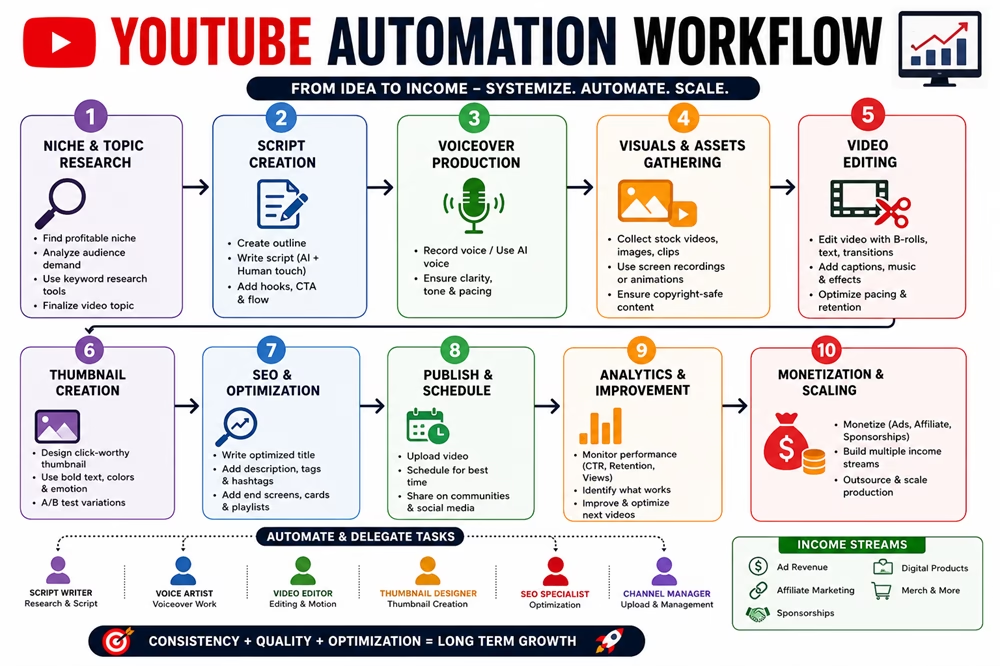
A realistic automation workflow
Here’s a simple system you can follow for your channel:
- Find low-competition topics
- Create a structured outline with hook, promise, benefit, example, CTA, etc.
- Generate script (AI + edit)
- Record voiceover
- Add visuals + edit
- Optimize title + thumbnail
- Publish
- Analyze performance
- Improve the next video based on high-performing videos
This is where automation becomes powerful. You need to have a repeatable workflow.
Earnings Potential (Realistic)
Automation channels can scale income, but it depends on the niche and execution.
Beginner (0–3 months)
- Focus: setup + content
- Earnings: $0–$50
Growing (3–6 months)
- Monetization starts
- Earnings: $100–$500
Scaling (6–12 months)
- Multiple videos ranking
- Earnings: $500–$3,000
Advanced (1+ year)
- System + team
- Earnings: $3,000–$10,000+/month
Automation increases earning potential because it increases output and consistency.
Earnings Examples with YouTube Automation
These examples show how an automation channel can grow income over time when you follow a good strategy and consistency.
Example 1: Scaling Channel (System-Based)
Niche: Finance / online income
Content Type: Explainers + case studies
Team: Script writer + editor
After 12 Months
- Total views/month: ~400,000
- RPM: $8–$15
- Ad revenue: ~$3,200–$6,000
- Affiliate income: ~$2,000–$5,000
- Digital products: ~$1,000
Total Monthly Earnings: ~$6,000–$12,000+
Key Insight:
System + outsourcing = higher output + higher income.
Example 2: Low-Quality Automation (Failure Case)
Niche: Generic facts
Content: AI-generated videos
Upload Frequency: Daily
After 4 Months
- Total views/month: ~10,000
- RPM: $1–$2
- Ad revenue: ~$10–$20
- Affiliate income: $0
Total Monthly Earnings: ~$10–$20
Key Insight:
Low-quality automation rarely grows or monetizes.
Short-Form Automation: The 2026 Growth Engine
In 2026, YouTube Shorts is no longer just an “extra” feature—it is the primary way new automation channels gain rapid traction. Short-form content requires a different automation philosophy because the “hook” must happen in the first 1.5 seconds.
Why Shorts Automation is Different
Hyper-Speed Editing: Unlike long-form, Shorts rely on constant visual changes (every 2 seconds) to maintain high retention.
The “Loop” Strategy: Successful automated Shorts are designed to end exactly where they begin, tricking the algorithm into counting multiple “views” per person.
Mass Production: You can realistically automate 3–5 Shorts per day using the same effort it takes to make one long-form video.
Shorts is a must for discovery in 2026. You should not ignore it.
YouTube Automation Tools (2026)
A solid tool stack helps you produce faster, maintain quality, and scale consistently. The goal isn’t to use more tools—it’s to use the right ones for each step.
1. Research & Topic Discovery
- YouTube Search – Autocomplete, “People also watch,” competitor ideas
- Google Trends – Spot rising topics
- AnswerThePublic – Questions people ask
- VidIQ (Free) – Keyword scores, competitor insights
Goal: Find low-competition, high-demand topics
2. Script Writing & Content Creation
- ChatGPT – Scripts, hooks, outlines
- Notion – Script planning & content system
- Google Docs – Simple drafting & collaboration
Pro Tip: Always remember to edit AI scripts to sound natural
3. Voiceover (AI + Human)
- ElevenLabs – Realistic AI voice
- TTSMaker – Free voiceovers
- Audacity – Clean audio (noise removal)
Goal: Clear, human-like delivery = better retention
4. Video Creation & Editing
- CapCut – Beginner-friendly, fast editing
- DaVinci Resolve – Advanced editing (free)
- Canva – Quick video + graphics
Goal: Smooth pacing + visual variety
5. Thumbnails & Design
- Canva – Easy thumbnail design
- Photoshop – Professional thumbnails
Goal: High CTR (click-through rate)
6. SEO & Optimization
- VidIQ – Tags, keyword insights
- TubeBuddy – SEO tools + A/B testing
Goal: Rank videos + improve discoverability
7. Publishing & Scheduling
- YouTube Studio – Upload, schedule, optimize
Goal: Consistent publishing
8. Analytics & Growth Tracking
- YouTube Analytics – CTR, retention, traffic
- Google Analytics – External traffic insights
Goal: Improve what works, fix what doesn’t
Recommended Tool Stack (Skill-Based)
Beginner Stack (Free)
- ChatGPT (scripts)
- CapCut (editing + captions)
- Canva (thumbnails)
- YouTube Studio (publishing)
Intermediate Stack
- ChatGPT + Notion
- ElevenLabs (voice)
- CapCut / DaVinci Resolve
- VidIQ / TubeBuddy
Advanced Stack (Scaling)
- Script writer + editor (outsourcing)
- ElevenLabs (voice automation)
- DaVinci Resolve
- VidIQ + analytics tracking
“Tools don’t grow your channel—your system does. Tools just make the system faster.”
ElevenLabs vs. TTSMaker: 2026 Comparison
| Feature | ElevenLabs | TTSMaker |
|---|---|---|
| Best For | High-retention | Quick Shorts, memes |
| Monetization Safety | High | Medium |
| Voice Variety | “Multilingual v2” human-like voices | Standard voices |
| Unique Feature | Instant Voice Cloning | No-login free tier |
| Commercial Rights | Starter Plan ($5/mo) | Pro/Lite plans ($9.99/mo) |
| Google/SGE Impact | Higher | Lower |
Biggest mistakes
Don’t do:
- Copy-paste AI scripts
- Weak thumbnails
- No niche focus
- Ignoring retention
- Overloading with low-quality uploads
- Expecting quick results
Note: Automation without strategy = slow growth.
Why 90% of Automation Channels Fail in Their First 3 Months
Most beginners enter YouTube automation expecting a “set and forget” money printer. The high failure rate isn’t usually due to the algorithm—it’s due to:
The “Generic Content” Trap: Many creators use 100% AI-generated scripts and stock footage without any unique editing or “Information Gain.”
Burnout from Unrealistic Expectations: They often expect monetization within weeks. When the first 20 videos get fewer than 100 views, they stop uploading.
Poor Niche Selection: Beginners often enter a highly competitive market without a plan to stand out.
Ignoring the “Human Touch”: Google and YouTube’s 2026 algorithms are sophisticated enough to detect low-effort “content farms.”
Key Takeaway: Success in automation isn’t about doing no work; it’s about building a system that produces quality at scale. If you treat it like a get-rich-quick scheme, the algorithm will treat your content like spam.
Automation vs personal channel
| Factor | Automation Channel | Personal Channel |
|---|---|---|
| Face required | No | Yes |
| Scalability | High | Medium |
| Branding | Lower | Stronger |
| Speed | Faster | Slower |
| Trust factor | Medium | High |
Best approach: Combine both if possible
Case Study: Niche-Focused Automation (Success)
Channel Type: Software tutorials (faceless)
Approach:
- Targeted long-tail keywords (e.g., “how to use X tool step by step”)
- Script (AI + manual edit), screen recordings, clear voiceover
- Consistent 2 videos/week + basic thumbnails
Results (90 Days)
- Avg views/video: 3,000 → 18,000
- CTR: 4.1% → 7.5%
- Avg View Duration: 3:10 → 6:00
- Subscribers: +120 → +1,050
- Revenue: ~$0 → ~$900/month (ads + affiliates)
What worked:
- Clear niche + search intent
- Human-edited scripts (no robotic tone)
- Tutorials matched thumbnail/title promise
Takeaway: Automation + useful content = scalable growth
“Automation works best when it enhances quality—not when it replaces it.”
Final verdict
YouTube automation is not a shortcut as you might think—it’s a system.
If you:
- build a clear niche
- focus on quality
- create repeatable workflows
- use tools wisely
- stay consistent
Then automation can help you grow faster and scale your channel efficiently.
If you chase shortcuts, it won’t work.
“Automation doesn’t replace effort—it multiplies it.”
Frequently Asked Questions
Is YouTube automation legal?
Yes, as long as you follow YouTube policies and create original, valuable content, not copied/modified content.
Can beginners start with automation?
Yes, but start simple. Focus on learning before scaling. Think of quality, engaging content for your audience.
Do automation channels make money?
Yes, you can earn through YouTube ads, affiliates, sponsorships, and digital products.
Is AI content enough for YouTube?
No. Use AI as an assistant, but never publish content before reviewing and editing.


Disclosure: We are partners or associates of Amazon and other top brands. We may earn a small amount from qualifying purchases without increasing the price. Please read our full affiliate disclosure here.

