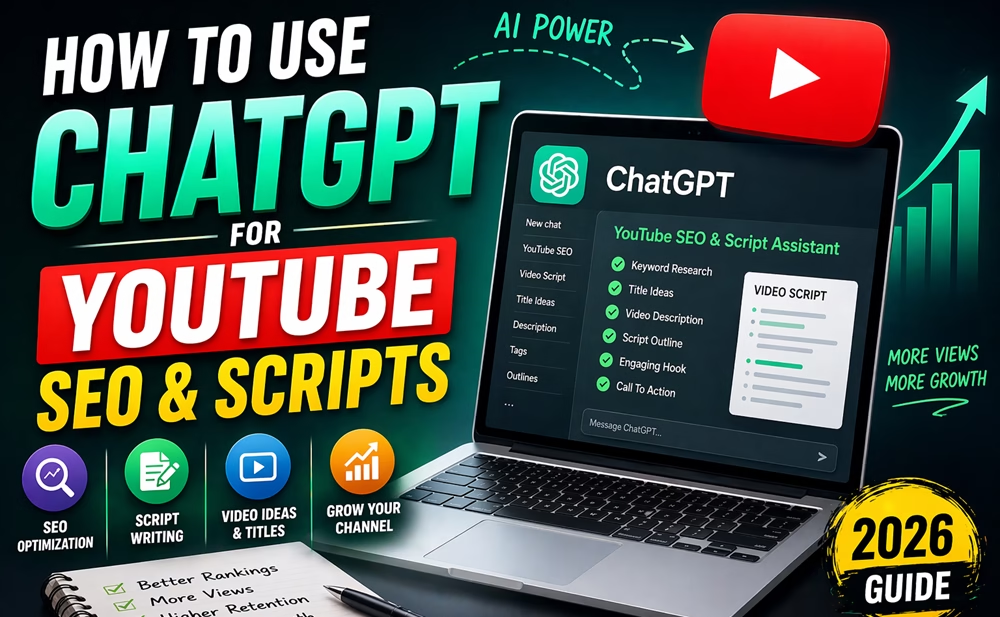
ChatGPT can speed up almost every part of YouTube planning, from topic research to script drafting and editing. OpenAI’s guidance emphasizes that ChatGPT works best when prompts are clear, specific, and refined iteratively. In their terms, OpenAI also describes ChatGPT as a tool people use for writing, research, editing, and idea development.
Yes, ChatGPT can help you produce better YouTube titles, stronger hooks, cleaner outlines, and faster first drafts with the right prompts. The key is to treat it like a creative assistant, not an autopilot. In short, use ChatGPT as a tool and improve the output by understanding your audience.
Table of Contents
Why ChatGPT helps with YouTube SEO
YouTube SEO is really a mix of topic selection, search intent, clickability, and retention. Using ChatGPT, we can quickly generate variations, organize ideas, and rewrite content in different tones and formats. OpenAI’s prompt guidance recommends giving enough context, being specific, and refining the prompt after reviewing the first result.
That means we can use ChatGPT to:
- brainstorm low-competition topic ideas
- turn one keyword into multiple title options
- draft descriptions and chapter outlines
- write script hooks and CTAs
- rewrite rough ideas into clear, viewer-friendly language
To understand how SEO works, read our YouTube SEO guide.
Step #1: Use ChatGPT to find video ideas
Make sure you have a clear niche and a specific goal for your channel. Do not ask vague questions like “give me YouTube ideas.” OpenAI recommends designing your prompts to clearly identify the task, context, and desired result.
Try any of these prompts to find video ideas. You can modify it if needed:
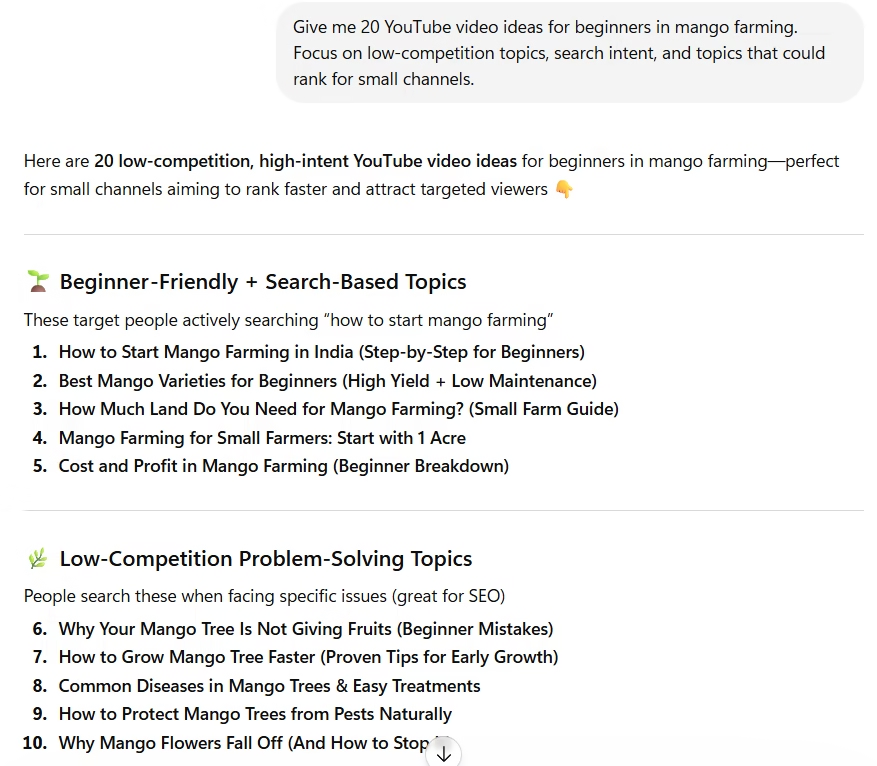
Give me 20 YouTube video ideas for beginners in [topic]. Focus on low-competition topics, search intent, and topics that could rank for small channels.
List 15 video topics for a [topic] channel. Group them into beginner, intermediate, and advanced difficulty.
Find topic ideas around [topic] that would be useful for [target audience].
For example, if your topic is mango farming, ChatGPT’s output looks like this:
Finding the right ideas is key. Learn how in our low-competition YouTube topics guide.
Step #2: Turn keywords into SEO-friendly titles
Once you have a topic to create your video, use ChatGPT to brainstorm titles that are clear and clickable. Tell it the keyword, the audience, and the style you want.
You can try any of these prompts:
Create 15 SEO-friendly YouTube titles for the keyword [keyword]. Make them clear, specific, and beginner-friendly.
Write 10 click-worthy titles for a YouTube video about [keyword]. Avoid clickbait and keep the titles natural.
Give me title options in three styles for [keyword]: search-based, curiosity-based, and practical how-to.
Step #3: Use ChatGPT to draft descriptions
A strong YouTube description helps viewers understand the video and gives you space to reinforce the topic for SEO. OpenAI’s writing guidance highlights ChatGPT as a useful tool for drafting and polishing copy, which makes it helpful for descriptions, too.
Use a prompt like this:
Write a YouTube description for [topic/title]. Include the main keyword naturally, a summary, timestamps, and a call to action.
If you want a better result, add details in the prompt like:
- audience level
- tone
- length
- CTA style
- related keywords
For example:
Write a 200-word YouTube description for [audience] about [title/topic]. Make it clear, SEO-friendly, and helpful, with natural keyword placement.
Step #4: Build a script outline before writing the full script
You can ask ChatGPT to generate a full YouTube script, but it is better to start with an outline. That gives you better control over structure and helps keep the video focused.
Prompt example:
Create a 7-part YouTube video outline for a tutorial about [topic]. Include a hook, an intro, main points, an example, and a call to action.
Make this outline suitable for a [niche] YouTube channel. Keep it practical, beginner-friendly, and easy to speak on camera.
- a hook
- the problem
- the solution
- examples
- a short recap
- a CTA
In the outline generated, include or exclude anything as you want. Then, you can ask to generate the full script.
Step #5: Write stronger hooks with ChatGPT
The first 10 to 15 seconds matter a lot, so use ChatGPT to create hooks that are short and direct. Since ChatGPT can follow up and revise based on your feedback, you can keep improving the hook until it feels natural.
You can use prompts like these:
Write 10 strong YouTube hooks for a video about [topic]. Keep each hook under 20 seconds when spoken.
Rewrite these hooks to sound more natural and less scripted.
Give me hooks in a problem-solution style for a beginner YouTube audience.
- show the problem
- promise the result
- create curiosity
Improve retention using our watch time & retention guide.
Step #6: Use ChatGPT for thumbnails and CTA text
You can use ChatGPT to generate short thumbnail text and calls to action. OpenAI encourages specificity and iteration, which works well here because thumbnail text needs to be short, sharp, and easy to scan.
Prompt examples:
Give me 20 thumbnail text ideas for a YouTube video about [topic]. Keep each option under 4 words.
Write 15 CTA lines for a YouTube video about [topic]. Make them specific and not generic.
- make it shorter
- make it more urgent
- make it more beginner-friendly
- make it more curious
Note: You can also generate your thumbnail with ChatGPT if you don’t use a separate tool.
Pair AI-generated titles with strong visuals using our thumbnail strategy guide.
Step #7: Use Projects to keep your work organized
If you are building a content system, ChatGPT Projects (version 5.4 or later) can help keep related chats, files, and instructions together so your work stays on topic across a long-running project. OpenAI says Projects are designed for repeated and evolving work such as writing, research, and planning.
That means you can keep one Project for:
- YouTube SEO ideas
- thumbnail text
- scripting
- content calendar planning
- video description templates
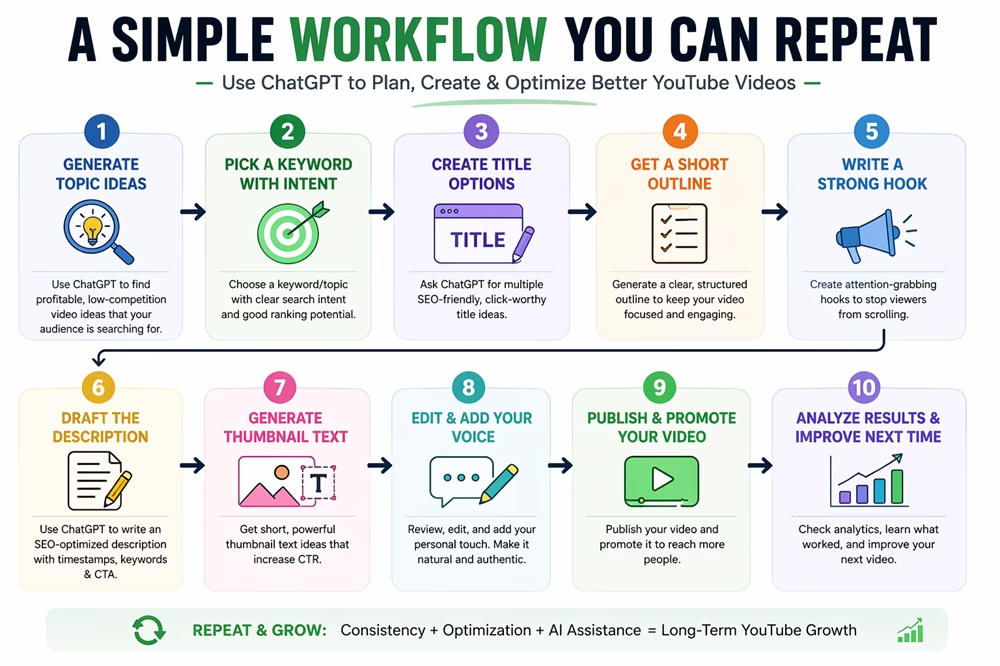
This is especially useful if you publish frequently and want a repeatable system.
Step #8: Use ChatGPT as an editor, not just a writer
The best results usually come from writing your rough version first, then asking ChatGPT to improve it. OpenAI’s guidance on prompt engineering stresses iteration, which fits editing perfectly.
Try these editing prompts by providing your input:
Make this YouTube script more concise and engaging without changing the meaning.
Rewrite this intro so it sounds more conversational and less robotic.
Shorten this description while keeping the SEO value intact.
Real-World Example: Refining a Script Hook
To see why the “editing” step is vital, look at the difference between a generic AI draft and a refined version.
The Scenario: You are making a video about “The Best Mango Farming Tips for Beginners.”
Version A: Generic AI Output (Before)
“Welcome to my channel. Today we will discuss how to grow mangoes. Mango farming is a popular agricultural practice that requires specific soil conditions and sunlight. In this video, I will show you five tips to improve your yield.”
Why it fails: It’s slow, dry, and lacks a “reason to watch” (hook).
Version B: Refined Human-AI Output (After)
“If your mango trees are flowering but the fruit keeps dropping before it’s ripe, you’re likely making one of three common mistakes. Today, we’re fixing that. I’m sharing the exact 5-step checklist I used to double my harvest this season—without using expensive fertilizers.”
Why it works: It addresses a specific pain point (fruit dropping), promises a result (doubled harvest), and creates curiosity (the secret checklist).
How to get this result:
Use the following prompt after ChatGPT gives you a first draft:
“This script is a bit too formal. Rewrite the hook to start with a common problem mango farmers face, use more ‘you’ and ‘I’ language, and make it sound like a friendly conversation between two growers.“
Key Takeaway for Creators
Google and YouTube both prioritize “Helpful Content.” By using ChatGPT to refine your tone rather than just generating blocks of text, you ensure your video feels personal and authoritative—which is exactly what keeps viewers from clicking away in the first 30 seconds.
Use the right tools alongside AI in our best free YouTube tools guide.
Step #9: Always review the output yourself
As discussed, we know that ChatGPT can help with drafting, but to match your style, you still need to check:
- accuracy
- tone
- clarity
- brand fit
- factual correctness
From our experience, we know ChatGPT follows instructions and can refine responses, but the human creator still needs to decide what fits the channel and audience best.
For YouTube especially, this matters because:
- your audience can tell when content feels generic
- your examples need to match your niche
- your CTA should sound like your channel, not a template
Will AI-Generated Scripts Hurt Your Channel?
A common concern among creators is whether YouTube or Google will penalize content made with ChatGPT. As of 2026, the short answer is no if the content is helpful and accurate. However, to stay on the safe side of the algorithm and maintain viewer trust, follow these three rules:
-
Add “Personal Experience”: AI cannot replicate your personal stories or unique perspective. Always inject your own anecdotes or specific case studies into the script. This satisfies Google’s E-E-A-T (Experience, Expertise, Authoritativeness, and Trustworthiness) criteria.
-
Fact-Check Everything: AI can sometimes “hallucinate” facts or statistics. Always verify technical data before filming to ensure your channel remains a credible source of information.
-
Disclose When Necessary: YouTube requires creators to disclose altered or synthetic content if it looks realistic (like AI-generated faces or voices). For scripts, a disclosure isn’t usually required, but keeping the tone “human” helps with audience retention.
Pro-Tip: Don’t just copy-paste. Use ChatGPT to build the “skeleton” of your video, then add your “soul” to the final draft. This ensures your content passes any “AI detector” and, more importantly, resonates with your real human viewers.
Final thoughts
ChatGPT is most useful for YouTube creators when you use it with structure. It can help you brainstorm, organize, rewrite, and speed up production, but the real advantage comes from clear prompts and repeated refinement.
If you use ChatGPT to support your ideas instead of copy-paste, you can build better videos faster and keep your content system consistent.
Frequently Asked Questions
Can ChatGPT help with YouTube SEO?
Yes. It can help with topic ideas, titles, descriptions, outlines, hooks, and thumbnail text.
Should I trust ChatGPT to write my full script?
Use it as a drafting and editing tool, then review the script yourself for accuracy, tone, and fit.
What is the best way to prompt ChatGPT?
Be clear, specific, and iterative. Give context, define the task, and refine the result after the first draft.
Can ChatGPT help me save time on YouTube content?
Yes. OpenAI describes ChatGPT as useful for writing, research, editing, and planning, which makes it a strong workflow tool for creators.
Disclosure: We are partners or associates of Amazon and other top brands. We may earn a small amount from qualifying purchases without increasing the price. Please read our full affiliate disclosure here.