Writing a comprehensive, high-quality blog post takes hours of research, drafting, and editing. Yet, after publishing, most marketers simply share the link once on social media and move on. Within a few days, that hard work fades into the background.
Creating fresh content for every social media platform from scratch directly leads to content burnout.
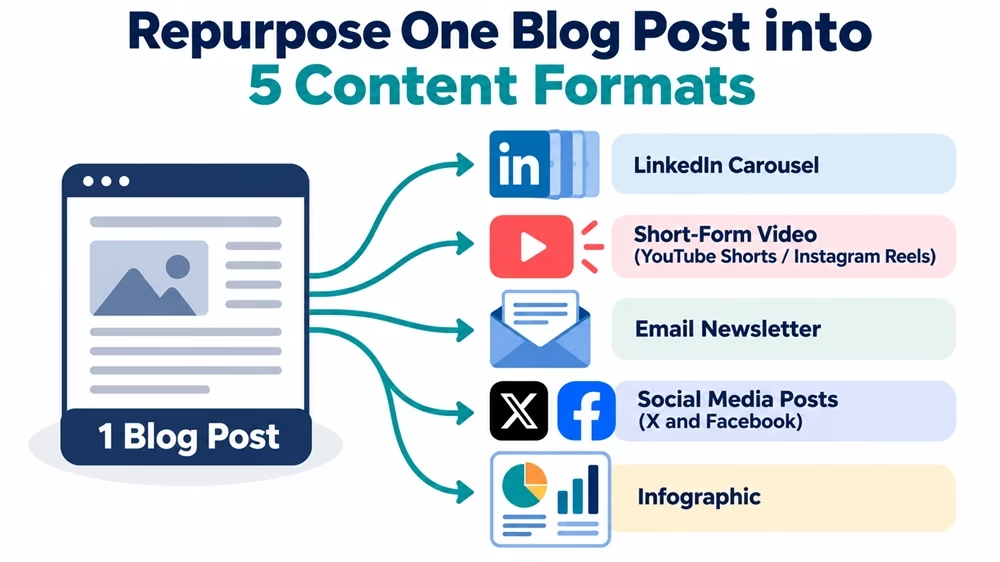
The secret to scaling your marketing without working double time is content multiplication (also known as content repurposing). By taking one long-form blog post and breaking it down into smaller, platform-specific micro-assets, you can power an entire week’s worth of social media content.
In this practical tutorial, you will learn how to use targeted AI prompts to turn one long blog post into five distinct micro-assets in just a few minutes.
One Blog Post, Five Content Assets
In this tutorial, you’ll choose one of your blog posts, such as 10 Ways to Improve Website SEO, and learn how one key insight can be transformed into different content formats.
For example, imagine an insight in the article such as – internal links help search engines discover related pages and help readers navigate a website.
With that single insight, you can create:
- LinkedIn carousel: Five slides explaining internal linking, its benefits, and common mistakes.
- Short-form video: A 30–45-second explanation of how to improve internal linking.
- Email newsletter: A short lesson explaining one internal linking improvement readers can implement today.
- X post: One concise takeaway about internal links, with a practical recommendation.
- Infographic: A visual checklist of internal linking best practices.
Let’s begin.
Step 1: Prepare Your Source Content & Feed Context to AI
Before asking AI to generate individual posts, first provide it with clear context. For this purpose, identify one of the best blog posts for repurposing. Look for pages that:
- Contain several distinct, useful takeaways.
- Address a problem the target audience cares about.
- Have accurate, reasonably current information.
- Can be divided into smaller lessons without losing context.
- Support a meaningful next step, such as reading a related article, subscribing to a newsletter, or exploring a service.
It’s not about finding a page containing many words. An article of 1,000 words with five distinct lessons may offer more repurposing opportunities than a 3,000-word article that repeats the same point.
Once identified, open your AI assistant (such as ChatGPT, Google Gemini, or Claude) and start with this priming prompt.
Copy and paste the prompt:
Act as an experienced content strategist and editorial assistant.
I will provide a published or publication-ready blog post. Analyze it to identify its central message, target audience, key takeaways, supporting evidence, practical recommendations, and potential opportunities for content repurposing.
Follow these rules:
- Use the supplied article as the primary source of factual information.
- Do not invent statistics, quotations, examples presented as real, research findings, or claims about results.
- Preserve important qualifications and context when summarizing the article.
- Identify statements that may require fact-checking or updating.
- Suggest which insights would work best as short-form video, a professional carousel, an email newsletter, social media posts, and an infographic.
- Identify any claims that would become misleading if removed from their original context.
For now, do not generate the individual content assets. First, provide a concise analysis of the article and wait for my next instruction.
Here is the source article:
[Paste your blog post or URL here]
Preserve the analysis in the same AI conversation when generating subsequent assets. This reduces the need to repeatedly supply the article, although the original source should still be checked whenever accuracy matters.
Step 2: Generate Asset #1 — LinkedIn Carousel Script
LinkedIn carousels (document posts) are among the highest-performing content formats for driving engagement and authority. They break complex lessons down into easy-to-swipe visual slides.
Copy & Paste the Prompt:
“Using the blog post provided, create a 6-to-8 slide LinkedIn carousel script. For each slide, provide: 1) Slide Number, 2) On-Screen Headline (under 10 words), and 3) Short Supporting Text or Bullet Points. Slide 1 must have a strong hook line to stop scrollers, and the final slide must feature a clear Call-to-Action (CTA). Keep the text concise and punchy.”
Pro Tip: Paste the generated output into a free Canva template to create a polished PDF carousel. It’s ready for upload.
Step 3: Generate Asset #2 — Short-Form Video Script (Reels / Shorts)
Short-form video dominates social platforms. Instead of filming a generic summary, use AI to format a structured script with visual directions (B-roll) and audio cues.
Copy & Paste the Prompt:
“Convert the main lesson of the blog post into a 45-second video script for YouTube Shorts and Instagram Reels. Format the output into a two-column table: [Visual / B-Roll Directions | Spoken Audio Script]. Include a 3-second attention-grabbing hook at the start and a follow CTA at the end.”
Step 4: Generate Asset #3 — Value-Packed Newsletter Summary
Email subscribers prefer concise, valuable insights instead of long, text-heavy emails. Use AI to condense your post into a quick-read newsletter entry that drives clicks back to your full article.
Copy & Paste the Prompt:
“Write a 150-word email newsletter entry based on this blog post. Use a warm, conversational tone. Structure it with: 1) An intriguing subject line, 2) A personal opener introducing the problem, 3) 3 quick bullet points summarizing the core value, and 4) A clear CTA button text linking to the full blog post on our website.”
As you need, you can even add instructions in the prompt to:
- Provide two or three subject-line alternatives.
- Avoid giving away so little information that the email feels like an advertisement for the article.
- Include one useful takeaway readers can apply immediately.
- Use a destination URL.
- Keep the email’s call to action consistent with its purpose.
Step 5: Generate Asset #4 — Platform-Tailored Social Posts
Posting the exact same caption across every social media platform looks lazy and reduces engagement. Each platform has its own culture and formatting style.
Copy & Paste the Prompt:
“Draft two separate social media text posts from the blog post: 1) A short X/Twitter post under 280 characters focusing on a single bold statement and key takeaway, and 2) A medium-length Facebook post using line breaks, relevant emojis, and an engaging question at the end to encourage comments.”
You can even ask the AI to generate:
- One primary version for each platform.
- An alternative opening or hook.
- A relevant call to action.
- Optional hashtags only where appropriate.
| Content Format | Primary Objective | What to Emphasize |
|---|---|---|
| LinkedIn Carousel | Explain an idea and encourage professional engagement. | A clear problem, logical progression, practical insights, and a relevant conclusion. |
| YouTube Shorts / Instagram Reels | Capture attention and communicate one useful idea. | A strong opening, one focused lesson, visual demonstrations, and a concise ending. |
| Email Newsletter | Deliver value directly to subscribers. | A relevant introduction, useful insights, and a natural reason to visit the full article. |
| X Post | Communicate a concise takeaway. | One strong idea, a specific observation, or a useful recommendation. |
| Facebook Post | Encourage discussion or share useful information. | An accessible explanation and a relevant question or discussion prompt. |
| Infographic | Make information easy to scan and remember. | A clear visual hierarchy, short labels, and a compact explanation. |
Step 6: Generate Asset #5 — Infographic / Cheat Sheet Outline
Visual summaries are highly shareable and save-worthy. You can use a cheat sheet outline to create quick graphic posts for Pinterest, Instagram, or community forums.
Copy & Paste the Prompt:
“Extract the essential steps or concepts from the blog post and arrange them into a simple, single-page Infographic Outline. List 4 key sections with a bold Title, a 1-sentence summary, and 1 key metric or visual icon recommendation for each section.”
You can also instruct the AI to use:
- One key fact, practical takeaway, or supporting statistic from the article, where available.
- A suggested icon, illustration, or simple diagram.
- A short label or caption.
- A suggested visual hierarchy.
Add an explicit instruction not to invent statistics. An AI-generated outline is not a finished infographic. You still need to check the content, design the graphic, and verify that the text remains legible on mobile screens.
Step 7: The Human Touch (Review & Polish)
AI is an efficiency tool, not a full replacement for human judgement. Before scheduling your new micro-assets, run through this quick quality checklist:
Brand Voice: Do these captions reflect your brand’s unique tone rather than reading as overly robotic?
Fact & Link Verification: Ensure all statistics, claims, and URLs precisely match your original source post.
Format Integrity: Check character limits and formatting requirements for each social network before publishing.
Source Fidelity: Confirm that each micro-asset preserves the core meaning and intent of the original article.
Audience Relevance: Verify that the asset provides genuine value to its intended target audience.
Platform Fit: Ensure the content feels native to the target channel rather than feeling copied or pasted from elsewhere.
Originality: Check that the presentation offers a fresh, useful perspective rather than merely mechanically repeating the source.
Accessibility: Include readable text, meaningful image descriptions, and any other relevant accessibility features.
Call to Action: Ensure the requested next step is appropriate and clear for the content.
Remember that AI may introduce unsupported claims, omit important qualifications, or produce content that sounds plausible but is not faithful to the source. So, your review or revision is necessary.
Create a Simple Distribution Plan
You don’t need to publish all your repurposed content at once. Instead, spread it across the week to maintain a consistent presence on different platforms.
For example,
- Publish the LinkedIn carousel on Monday
- Share a short-form video on Tuesday
- Send the email newsletter on Wednesday
- Post your adapted content on X or Facebook on Thursday
- Share the infographic on Friday.
Adjust this schedule to suit your audience and publishing routine. Monitor engagement, clicks, and other relevant performance metrics to identify which formats work best, then use those insights to improve your future content distribution strategy.
Summary Checklist
Step 1: Feed clean blog text into the AI with context.
Step 2: Prompt for a slide-by-slide LinkedIn Carousel script.
Step 3: Prompt for a 45-second video script with B-roll directions.
Step 4: Prompt for a 150-word email newsletter entry.
Step 5: Prompt for tailored text posts for X and Facebook.
Step 6: Prompt for a visual infographic/cheat sheet outline.
Step 7: Polish, add personal touches, and schedule your posts!
Disclosure: We are partners or associates of Amazon and other top brands. We may earn a small amount from qualifying purchases without increasing the price. Please read our full affiliate disclosure here.

Related posts:
- How to Build a 30-Day Social Media Content Calendar Using AI Prompt Chaining
- What is Hyper Personalization Marketing? Examples and Tools
- 7 ChatGPT to Human Text Converters: Making It Like Human-Written
- Your Guide to Best DeepSeek Courses: From Beginner to Expert Level 2026
- 76 ChatGPT Prompts to Boost Your Website Traffic
