How to Build a 30-Day Social Media Content Calendar Using AI Prompt Chaining

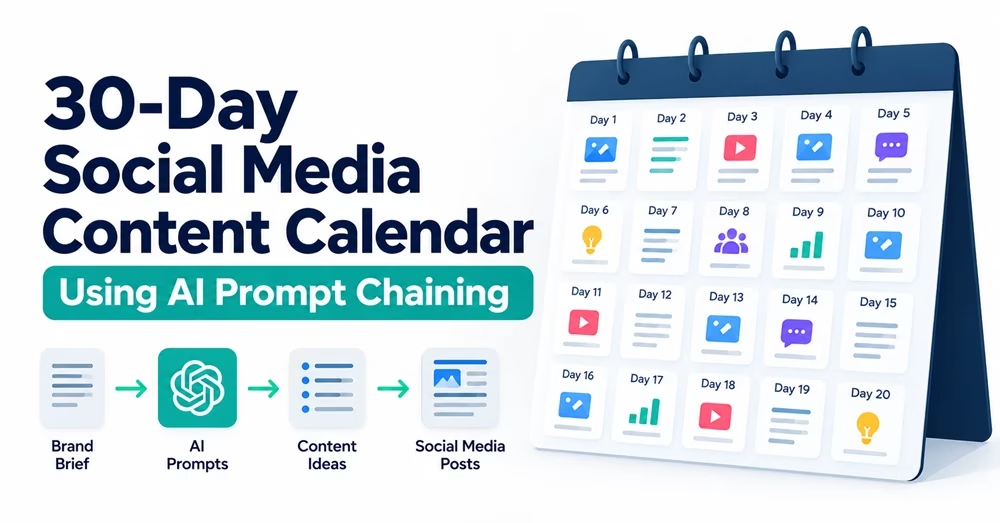
30-day social media content calendar using AI prompt chaining, from brand brief and AI prompts to content ideas and social media posts

If you create content for social media every single day, you can feel overwhelming. Use the power of AI tools like ChatGPT or Gemini. But many beginners use them and ask straightforward questions, something like this:

“Give me 30 social media post ideas for my business.”

What happens next? The AI usually produces a list of generic, repetitive ideas in response to such a question. The result is that you’ll see a response that doesn’t align with your brand’s voice or goals.

Enter the idea of AI Prompt Chaining.

In this practical tutorial, you will learn how to use prompt chaining to create a full 30-day content calendar, with content themes, hooks, captions, calls to action, and visual ideas.

Table of Contents

What Is AI Prompt Chaining?

Prompt chaining means breaking a big task down into smaller, connected steps. Instead of asking AI to do everything in one single prompt, you guide it step-by-step as follows:

  • Step 1: Give context about your business.

  • Step 2: Define core content themes (pillars).

  • Step 3: Plan daily post topics.

  • Step 4: Write full captions and calls-to-action.

  • Step 5: Add visual suggestions or image prompts.

  • Step 6: Format everything into a clean table for your spreadsheet.

This approach is consistent with Google’s explanation of prompt design strategies, which describes how complex tasks can be broken into sequential prompts, with each step using the output of the previous one.

A 30-day content calendar does not necessarily mean publishing every day. Choose your own posting frequency for each platform based on your audience, available resources, and campaign objectives. So, you are free to modify an AI prompt based on your posting frequency.

Step-by-Step Tutorial: Building Your 30-Day Calendar

Learn the six steps in detail and follow them. Copy and paste the given prompt templates into your AI assistant, filling in your business details where indicated. I already tried these prompts, but you can modify any of them if adjustments are needed to achieve your goal.

If you are using an AI tool for the first time, choose ChatGPT, Gemini, or another tool and sign up. After that, use the prompts below.

Step 1: Set Up Brand Context

Before asking for social media content ideas, give the AI a clear brand brief, who you serve, and how you want to sound. Your prompt can have these:

  • Target social media platforms
  • Posting frequency to prevent an unrealistic workload
  • Primary business objectives like awareness, lead generation, or sales
  • Upcoming events and promotions
  • Available time and resources
  • Existing high-performing posts
  • Brand restrictions to avoid unwanted claims, expressions, offers, and tones

> OpenAI’s guide to effective ChatGPT prompts

Use this prompt:

“Act as a senior social media strategist. I am creating a 30-day social media campaign for [Insert Business Name or Niche, e.g., an online English learning blog]. Our target audience is [Insert Target Audience, e.g., beginner English learners and students]. Our goal is to [Insert Main Goal, e.g., build brand awareness and drive website visits]. Our brand voice is [Insert Tone, e.g., encouraging, simple, and helpful]. Acknowledge that you understand these parameters, but do not generate any post ideas yet.”

Carefully read the prompt and fill in the necessary details in the placeholders []. After that, copy the text and paste it into the AI tool. The AI will first identify your preferences before generating any post ideas.

Step 2: Define Your Content Pillars

Get ready to use the next prompt. Content pillars are the main topics your brand talks about. You need to have 3 to 4 core pillars to keep your social media page structured and balanced.

Now, use this prompt as you did earlier:

“Based on the brand context provided, propose 4 distinct content pillars for our 30-day campaign. For each pillar, provide a brief 1-sentence description and one sample post idea.”

See the response. Based on your first prompt, you’ll see the content pillars for you.

For example:

  • Educational Tips
  • Behind-the-Scenes
  • Customer Proof/Testimonials
  • Promotional/Sales posts

1. How many pillars should you use?

Three to five is a reasonable starting point, depending on your business and content resources.

2. How should you distribute posts across those pillars?

It depends on your campaign objective. An educational website may prioritize useful lessons and quizzes, whereas a business launching a new product may need more launch-related content.

3. How can you prevent repetitive posts?

You can ask the AI to check the topic matrix for repeated ideas, consecutive promotional posts, and excessive reliance on a single pillar before generating captions.

Step 3: Create the 30-Day Topic Matrix

Now that you have your core pillars, ask the AI to map out 30 daily topics divided among those pillars.

The prompt to do this is here:

“Using the 4 content pillars defined above, create a 30-day post outline (Days 1 to 30). For each day, list: 1) Day Number, 2) Content Pillar, 3) Core Topic, and 4) Main Goal of the post. Format this as a simple numbered list.”

Then, you can use the following quality-control prompt to introduce a stage for evaluating and improving intermediate results:

“Review the 30-day topic matrix before generating captions. Identify repetitive topics, overlapping ideas, excessive promotional content, and content pillars that are underrepresented. Suggest improvements while preserving the campaign goal, the approved content pillars, and the posting frequency. Do not rewrite the entire plan until I approve the proposed changes.”

Worked Example: Creating a Social Media Content Calendar for a Software Business

Imagine a software company, TaskFlow. Let’s see how it uses AI prompt chaining to plan its social media content for 30 days.

TaskFlow offers project management software for small businesses and remote teams. Its goal is to increase brand awareness, engage potential customers, and drive website traffic.

Step 1: Define Content Pillars

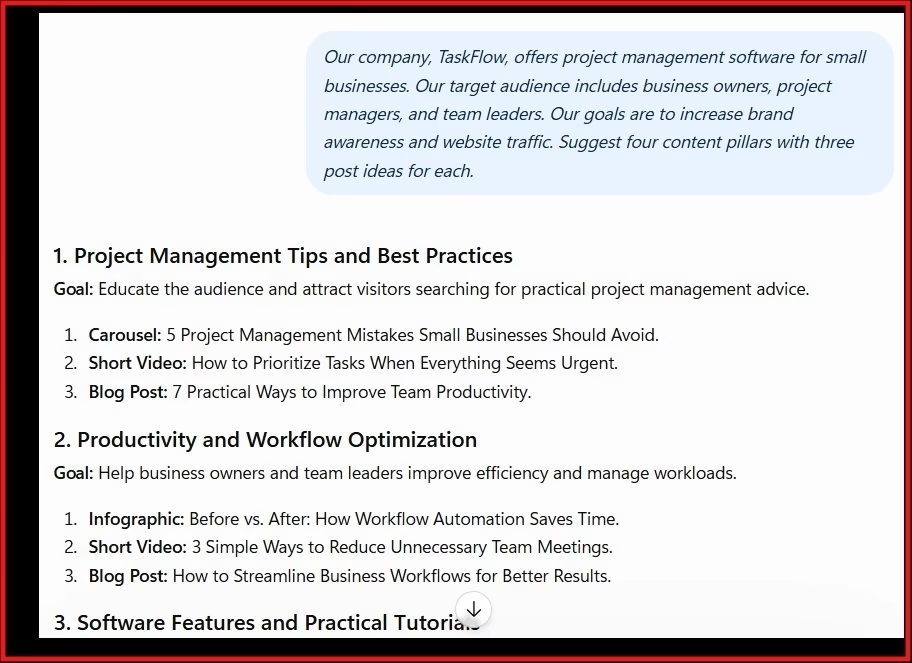
First, I provide the AI (ChatGPT or any other tool) with the business details and ask it to suggest four content pillars.

Prompt:

“Our company, TaskFlow, offers project management software for small businesses. Our target audience includes business owners, project managers, and team leaders. Our goals are to increase brand awareness and website traffic. Suggest four content pillars with three post ideas for each.”

I use ChatGPT. Here is a screenshot of the content pillars it suggests:
Step 2: Generate the Topic Calendar

Next, I ask the AI to distribute topics across the 30-day campaign.

Prompt:

“Using the four approved content pillars, create a 30-day social media topic calendar. For each day, provide the content pillar, post topic, and primary objective. Avoid repetitive topics and excessive product promotion.”

I have to review the suggested topics before moving to the next step. It is to ensure that duplicates are removed and that the content addresses your audience’s needs. Here is the screenshot of ChatGPT:
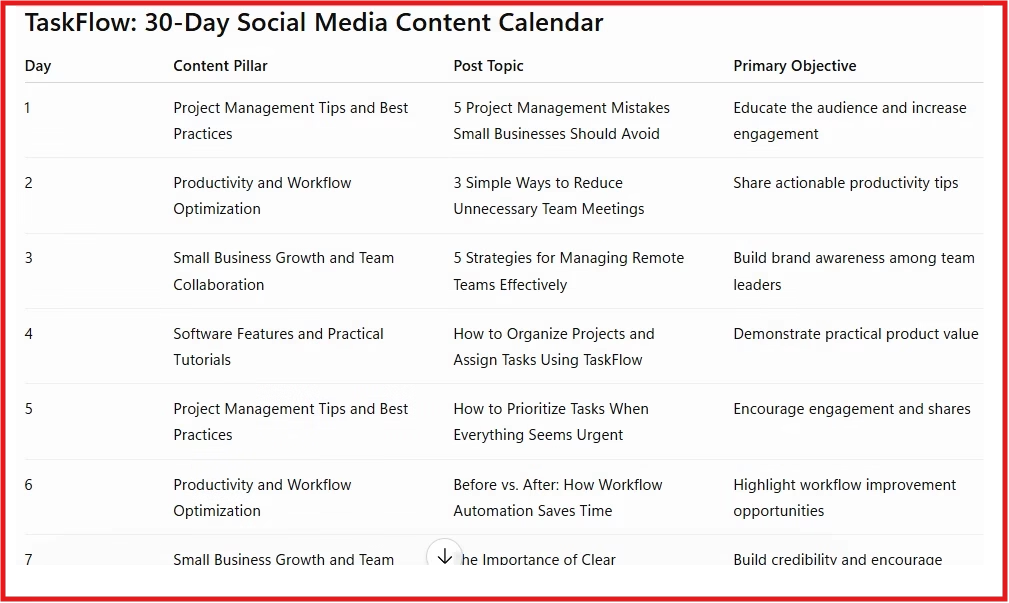
Screenshot of social media calander by ChatGPT

Step 3: Turn a Topic into a Complete Post

I see the topic for Day 1. Next, I use the following prompt.

Prompt:

“Write a LinkedIn post about five common reasons projects fall behind schedule. Start with an engaging hook, provide practical advice, and end with a question that encourages discussion. Suggest a suitable visual.”

Here is the ChatGPT response:
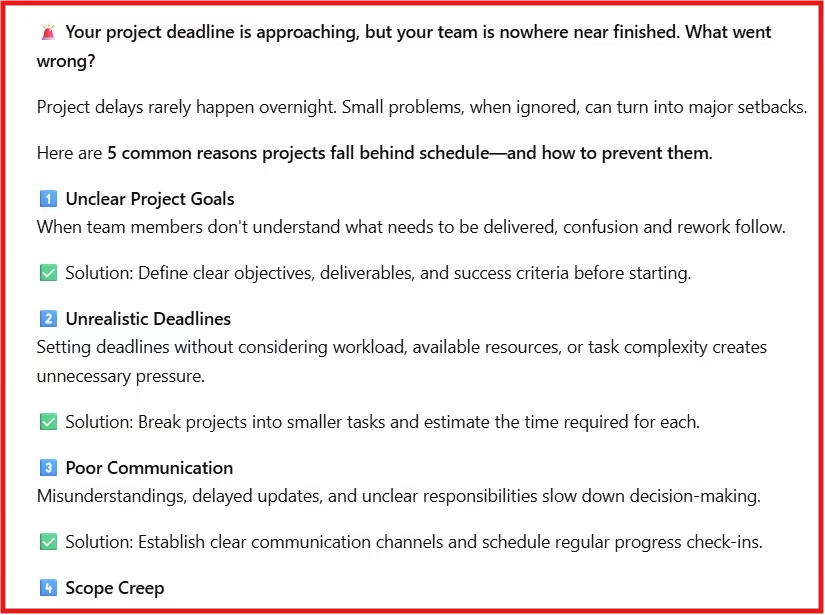
Screenshot of LinkedIn post creation

I review the content for accuracy and relevance before publishing and verify any product claims against the company’s actual features.

Step 4: Organize the Content Calendar

After generating the remaining posts, I ask ChatGPT to combine them into a spreadsheet-ready table with columns – Day, Content Pillar, Topic, Format, and Call to Action.

I continue until the calendar covers the entire 30-day period, adding the planned publishing dates and platforms as needed.

Key takeaway: Instead of asking AI to generate 30 random ideas, you can use connected prompts to define content pillars, plan topics, develop posts, and organize the calendar. Review the results before publishing, then use the performance data to improve your plan for next month.

Step 4: Write Captions, Hooks & Calls-to-Action

To avoid hitting output length limits or getting rushed results, generate your captions in small batches (10 days at a time).

Prompt (Batch 1: Days 1–10):

“Take Days 1 through 10 from the outline above. Write complete social media captions for each day. Include: 1) A catchy hook line to stop scrolling, 2) The main post body with clean line breaks and relevant emojis, and 3) A clear Call-to-Action (CTA) matching the post goal.”

After the AI finishes, repeat this exact prompt for Days 11–20 and Days 21–30.

Remember: You must update the date range in each subsequent prompt.

For example:

  • Batch 1: Generate captions or visual directions for Days 1–10.
  • Batch 2: Replace the range with Days 11–20.
  • Batch 3: Replace the range with Days 21–30.

Step 5: Add Visual Directions

Matching your text with the right image or short video idea makes your content stand out.

Here is the prompt for it:

“For Days 1 through 10, suggest a specific visual directive for each post. Specify whether it should be a graphic text overlay, a photo style, or a short-form video idea (Reels/Shorts).”

Repeat for Days 11–20 and Days 21–30.

Important: Change the day range in each prompt before submitting it, as you did in Step 4. Do not reuse the original Days 1–10 instruction unchanged.

Step 6: Export to a Spreadsheet Table

Finally, organize your entire month’s plan into a clean table that you can copy directly into Google Sheets, Excel, or social media scheduling tools like Buffer or Hootsuite.

Use this prompt:

“Combine the approved outputs for Days 1–30 into one complete social media content calendar. Use a tab-separated format that I can paste directly into Google Sheets or Excel.

Include these columns:

Date | Day | Social Media Platform | Content Pillar | Post Format | Post Goal | Hook | Caption | Call-to-Action | Visual Idea | Status | Performance Metric

Include every planned post without omitting or duplicating any day. Keep each field in its own column, and do not insert line breaks within individual cells. If a detail has not been provided, mark it as “Needs Review” rather than inventing information.

If the complete calendar is too long to produce reliably in one response, generate it in three batches: Days 1–10, Days 11–20, and Days 21–30. Use exactly the same columns in each batch.“

How to Adapt Your AI-Generated Content for Different Social Media Platforms

Your content needs to be customized for the specific platform and its audience you are working with. Ask the AI to produce platform-appropriate versions rather than copy the same caption everywhere.

A useful additional prompt template is:

Take the approved content topic and adapt it for [platform]. Recommend the most suitable post format, opening hook, caption structure, call-to-action, and visual direction for that platform. Preserve the core message, but do not simply copy the original caption. Follow the platform requirements supplied in the brief. Do not invent statistics, testimonials, or product claims.

This will make your content-repurposing workflow more realistic for each social media platform.

Important: The Human Review Step

Remember, AI is an assistant. So don’t use the exact output it generates. Before scheduling your posts, use the following table as your checklist:

Review itemWhat you should check
AccuracyAre all facts, dates, statistics, links, and product details correct?
Brand voiceDoes the copy sound consistent with the brand?
RepetitionAre topics, hooks, and captions unnecessarily similar?
Audience relevanceDoes each post serve a meaningful audience need or campaign objective?
Claims and testimonialsAre product claims supportable? Are customer experiences genuine and authorized for use?
Visual assetsAre the images and other assets suitable and cleared for their intended use?
Platform suitabilityDoes the format work for the intended platform?
AccessibilityAre text overlays readable, and are captions or other accessibility features appropriate?
CTA and linksDo the CTA, destination URL, and proposed action match the post’s objective?
SchedulingAre the dates, times, and publishing sequence correct?

How to Measure and Improve Your Social Media Content Calendar

This is important. Check how the performance metrics match your goal based on objectives with the platform’s analytics at the end of the month:

ObjectivePossible performance measures
Brand awarenessReach and impressions
EngagementRelevant interactions, comments, shares, and saves where available
Website trafficLink clicks and website sessions from social media
Lead generationQualified leads or completed lead forms
SalesPurchases or conversions attributable to the campaign, where measurable

Summary Checklist

    1. Context First: Tell the AI who you are and who your audience is.

    2. Pillars Second: Set 4 clear content categories.

    3. Outline Third: Map out 30 topics.

    4. Draft in Batches: Write captions 10 days at a time.

    5. Add Visuals: Define image and video directions.

    6. Format & Review: Export to a spreadsheet and polish the language yourself.

Learn more

Looking for a social media tool to boost your campaign productivity? → Look at AppSumo

Disclosure: We are partners or associates of Amazon and other top brands. We may earn a small amount from qualifying purchases without increasing the price. Please read our full affiliate disclosure here.

Leave a Comment

Your email address will not be published. Required fields are marked *

CommentLuv badge

This site uses Akismet to reduce spam. Learn how your comment data is processed.

Scroll to Top