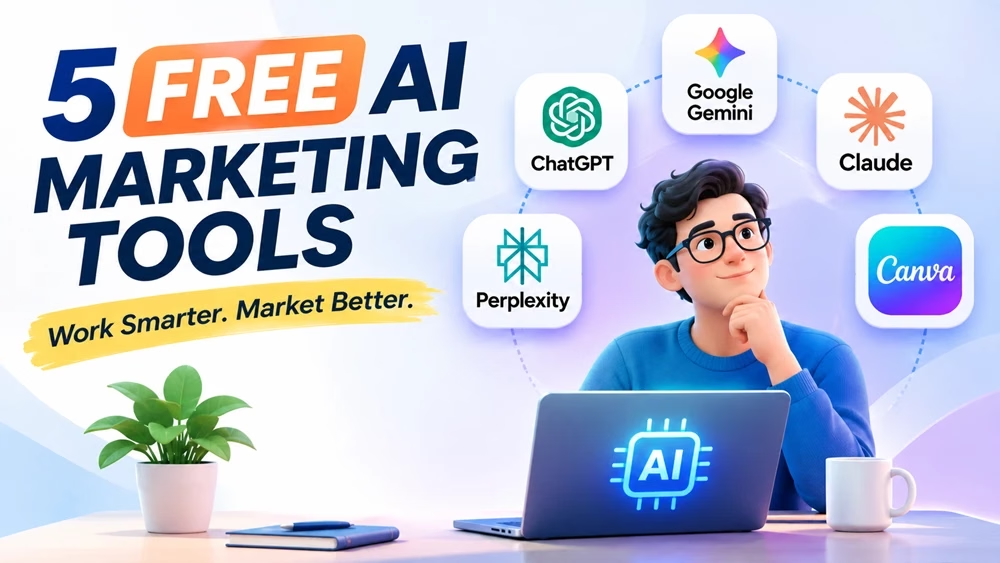
Scaling content production doesn’t necessarily require expensive AI subscriptions. We can start from zero. Many leading AI platforms offer free plans that you can use for your marketing research, content creation, advertising, and visual design. Although paid subscriptions offer higher usage limits and additional useful features, we can use free versions for many everyday marketing tasks.
Take advantage of using multiple free AI tools for various marketing tasks instead of relying on a single paid one. In this article, we will discuss how combining five specialized tools can build an affordable marketing workflow that covers research, ideation, content creation, fact-checking, and graphic design.
This article will be a valuable resource for small business owners, digital marketing novices, freelancers, and small marketing teams.
The Zero-Dollar AI Marketing Stack
| AI Tool | Primary Marketing Application |
|---|---|
| ChatGPT | Ad hooks, marketing ideas, and meta tags |
| Google Gemini | Search trends, competitor research, and content planning |
| Claude | Long-form content, newsletters, and brand voice |
| Perplexity | Cited statistics, market research, and fact-checking |
| Canva AI | Social media graphics, banners, and marketing visuals |
Here are five useful free AI marketing tools, their capabilities, limitations, and practical prompts you can use to get better results.
1. ChatGPT (Free Plan) — Campaign Ideation and Ad Copy Variations
What You Get for Free
OpenAI offers a free version of ChatGPT useful for everyday text conversations and several marketing tasks. We can use it for brainstorming, writing, web searches, data analysis, file uploads, and image generation, although it has usage limits.
You can use ChatGPT to generate marketing ideas, develop advertising messages, and prepare different versions of promotional content. ChatGPT is best used for:
- Generating multiple A/B testing variations for Facebook, Instagram, LinkedIn, and Google Search ads.
- Writing SEO meta titles, meta descriptions, and FAQ questions.
- Brainstorming campaign/content angles, webinar titles, and lead magnet ideas.
- Creating email subject lines and promotional messages.
Limitations
Free users have unlimited everyday text chats subject to abuse-prevention safeguards, but certain models and additional tools are reserved for paid users. File uploads, image generation, and data analysis have usage limits. [OpenAI ChatGPT Free Tier FAQ]
Pro Tip: Use text prompts for simple marketing tasks but upload documents only when necessary. Plan good prompts beforehand. Instead of several prompts, use a well-planned prompt to reduce usage.
Prompt 1: High-Converting Ad Hook Generator
Act as a direct-response performance marketer.
Product/Service: [INSERT PRODUCT NAME AND DESCRIPTION]
Target Audience: [INSERT AUDIENCE AND MAIN PAIN POINT]
Platform: [Facebook/Instagram Ads, LinkedIn Ads, or Google Ads]
Brand Voice: [INSERT BRAND VOICE]
Generate nine distinct ad copy variations categorized into three psychological angles:
Pain-Point Agitation (3 variations)
Curiosity/Contrarian Hook (3 variations)
Social Proof/Outcome-Driven (3 variations)
Keep each primary text under 60 words and include a compelling headline (under 40 characters) and a clear call to action (CTA).
Focus on realistic benefits. Avoid exaggerated claims and unsupported promises.
Practical Example:
To test this prompt, let’s assume we are promoting an online digital marketing course designed for beginners.
The following are two examples of advertising copy that ChatGPT could generate:
1. Pain-Point Agitation
Headline: Struggling to Start Digital Marketing?
Ad Copy: Want to build a career in digital marketing but don’t know where to begin? Learn SEO, social media marketing, content marketing, and more with a beginner-friendly online course. Start developing practical skills at your own pace.
CTA: Explore the Course
2. Curiosity-Driven
Headline: What Can Digital Marketing Do for You?
Ad Copy: Businesses need people who understand digital marketing. Whether you want to improve your career prospects, promote your business, or explore freelancing, learning digital marketing can open up new opportunities. Discover the essential skills you need to get started.
CTA: Start Learning Today
ChatGPT can quickly generate multiple advertising angles for the same product. However, the first drafts may be generic. Review, include your specific product benefits, and adjust anything for your brand and product. Or, you can also improve any results with your instructions until you achieve the desired quality.
2. Google Gemini (Free Plan) — Marketing Research and Search Trends
What You Get for Free
Use Google Gemini for research, brainstorming, content planning, and everyday productivity tasks. It integrates with Google Search and can explore current topics, identify search trends, and research information available online.
Its advanced capabilities and usage limits are available for paid users. Gemini is best used for:
- Identifying current topics, search trends, and seasonal content opportunities.
- Exploring search intent and potential content gaps in competitor articles.
- Preparing marketing research briefs and content outlines.
- Organizing research and developing ideas for blog posts and campaigns.
Limitations
Gemini’s free plan has usage restrictions, particularly for advanced models and resource-intensive features such as Deep Research. Google may adjust usage limits and feature availability depending on demand, capacity, and account eligibility. [See Google Gemini Usage Limits]
Pro Tip: Use Gemini at the beginning of your content planning process. Ask it to research your topic, identify relevant user questions, and prepare a structured brief. Then use ChatGPT or Claude to develop the content. Always verify important findings against original sources in the content.
Prompt 2: Competitor and Search Intent Audit
Act as an SEO and market research analyst.
Target Keyword: [INSERT KEYWORD]
Target Audience: [INSERT AUDIENCE]
Search the web for current information, relevant search trends, and high-ranking content related to this topic.
Prepare a structured research brief containing:
Search Intent: Identify the primary and secondary search intent.
User Pain Points: Identify five problems or questions users have about this topic.
Competitor Analysis: Examine the main topics covered by relevant high-ranking pages.
Content Gaps: Identify useful questions or subtopics that competing pages do not adequately address.
Related Questions: Suggest five relevant questions that could be addressed in my article.
Content Recommendations: Suggest additional information, examples, and resources that could make my article more useful.
Provide source URLs for important findings. Distinguish verified information from your own recommendations.
Practical Example:
Open Gemini and fill in the required information in the prompt, then paste it into Gemini.
Suppose you are writing an article targeting the keyword “Best SEO Tools for Beginners.” Gemini can help identify topics and questions that competing articles may not adequately cover. It can make your article more useful by including a beginner-friendly comparison, practical recommendations, and examples of how to use different SEO tools.
But review it carefully for accuracy and add your personal insights to make it more unique.
3. Claude (Free Plan) — Long-Form Content and Email Marketing
What You Get for Free
With Anthropic’s Claude, you can use it for writing, editing, research, and other productivity tasks. You can also perform web search, create files, and use Artifacts to develop and work with content in a structured interface.
Marketers use Claude to draft newsletters, edit blog posts, improve readability, and adapt content to a specific brand voice. It is best used for:
- Drafting newsletters, landing pages, and long-form blog posts.
- Rewriting prewritten copy to match your brand voice.
- Improving existing content for clarity and readability.
- Creating structured FAQs, content outlines, and comparison tables.
Limitations
Claude’s free plan can hit the usage limit at any time, depending on your conversation length, model selection, file sizes, and the features you use. This means that heavy research and lengthy conversations can consume more of the free usage allowance. [See Claude Limits and Plans]
Pro Tip: Start a separate conversation with another AI like ChatGPT. Provide relevant background information and clear instructions. This can help you manage usage and keep more room for your writing projects with Claude.
Prompt 3: Anti-Fluff Newsletter and Blog Writer
Act as a senior content strategist writing for [INSERT BRAND/WEBSITE].
Topic: [INSERT TOPIC]
Target Audience: [INSERT AUDIENCE]
Primary Keyword: [INSERT KEYWORD]
Key Points to Cover: [PASTE 3–5 BULLET POINTS]
Write a 600-word article/newsletter draft following these style guidelines:
Open with a relatable problem or interesting insight in the first two sentences.
Use short paragraphs (2–3 sentences maximum).
Include relevant headings and scannable bullet points.
Avoid generic introductions and repetitive explanations.
Do not use unnecessary AI clichés such as “delve,” “unlock,” “game-changer,” or “in today’s fast-paced world.”
Maintain a practical, conversational, and informative tone.
Avoid inventing statistics, quotations, or references.
Prioritize reader usefulness over keyword repetition.
After filling in the required information in the above prompt, paste it into Claude. You’ll get a nice piece of content. However, you still need to review and edit it to achieve your desired quality, or ask it to be refined as you want. Remember that you can modify the prompt if necessary.
4. Perplexity (Free Plan) — Cited Market Research and Fact-Checking
What You Get for Free
Perplexity is an AI-powered search and research platform that provides answers and source references with clickable links. Its free plan offers practically unlimited basic searches.
AI marketers use it to locate industry statistics, explore unfamiliar subjects, and verify information before publishing content. Perplexity is best used for:
- Finding recent industry statistics and original research reports.
- Fact-checking claims generated by other AI platforms.
- Researching unfamiliar industries before preparing marketing campaigns.
- Identifying useful reports, surveys, and publications for content development.
Limitations
In the free plan, you have limited access to Pro Searches and Research queries. Advanced AI models and certain additional features require a paid subscription. Also, citations do not automatically guarantee accuracy. So, don’t forget to check the original source before using statistics or research findings. [See Perplexity limit for free users]
Pro Tip: Use your free Pro Searches (if available) only for complex research questions and multi-step comparisons. Use standard searches for normal searches and information retrieval.
Prompt 4: Verified Statistics Finder
Find five recent, verifiable statistics (from 2025 or 2026) regarding:
Industry/Topic: [INSERT INDUSTRY OR TOPIC]
For each statistic, provide:
The exact metric or finding.
The original publishing organization or study name.
The publication date.
A direct link to the original research or report.
The sample size and geographical coverage, if available.
A one-sentence explanation of what the finding means for digital marketers.
Prioritize original research, government publications, recognized industry organizations, and reputable research institutions.
Do not invent statistics or provide unsupported figures. If a statistic cannot be verified from its original source, exclude it.
Practical Example:
I fill in the required information in the prompt placeholder as “Growth of AI use in the USA”. Then, I paste it into Perplexity. Below is a screenshot of its output.
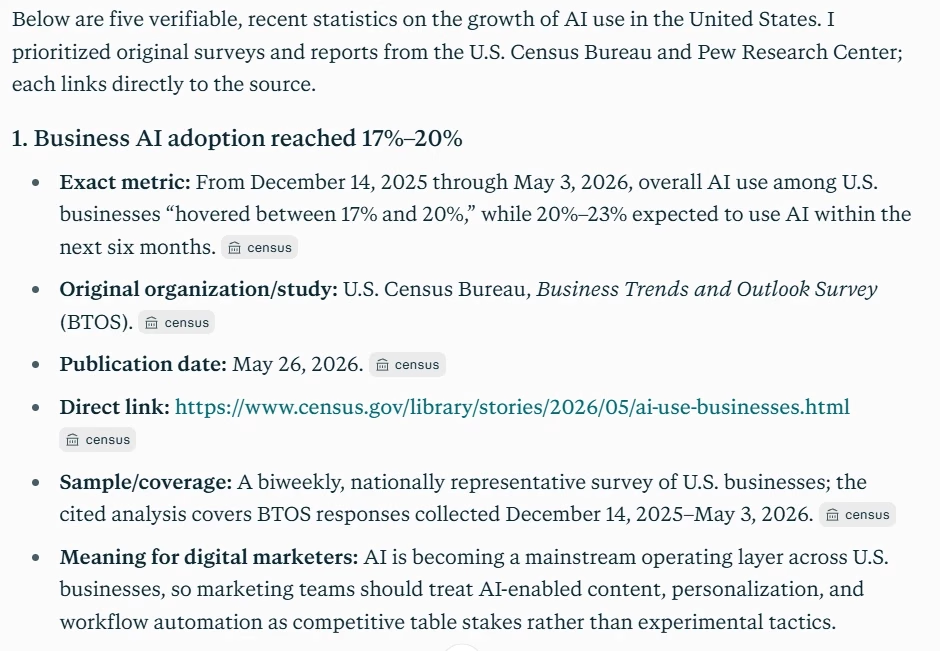
Perplexity gets information from original sources. They are reliable, but they should be checked for factual accuracy.
5. Canva AI (Free Plan) — Social Media Graphics and Marketing Creatives
What You Get for Free
Canva provides a free graphic design platform with templates, photos, graphics, and selected AI-powered design features. You can use its AI tools with a limited monthly allowance. You can use it for AI-assisted writing, image generation, and other creative capabilities.
With Canva, you can create attractive visuals without hiring a professional designer for every project. It is best used for:
- Creating featured images, YouTube thumbnails, and social media graphics.
- Designing LinkedIn and Instagram carousel posts.
- Preparing promotional banners and marketing materials.
- Generating visual concepts.
Limitations
Canva Free provides limited access to AI features. Some advanced editing tools, premium assets, and additional capabilities require a paid subscription. Its AI allowance is shared across eligible tools, so frequent use of resource-intensive features can consume it more quickly.
Pro Tip: Only use Canva’s AI tools to generate custom visual concepts. You can then use available free templates and design elements to save your free usage limit.
Prompt 5: Canva Magic Media Visual Prompt
Create a clean, modern flat vector illustration of a digital marketer analyzing growth charts on a sleek laptop.
Include floating minimalist icons representing email marketing, search engines, social media, and analytics.
Use a warm teal, navy blue, and soft coral color palette.
Composition: Balanced layout with the main subject positioned centrally.
Background: Clean white background with sufficient negative space.
Style: Professional editorial technology illustration suitable for a digital marketing blog.
Format: Landscape 16:9 aspect ratio.
Avoid text, logos, watermarks, and unnecessary decorative elements.
Practical Example:
Below is the illustration generated by Canva AI Art Generator using the prompt.

Free AI Marketing Tools: Quick Comparison
| Tool | Primary Marketing Strength | Free-Plan Limitations |
|---|---|---|
| ChatGPT | Ad copy, marketing ideas, and meta tags | Separate limits for advanced models and additional tools |
| Google Gemini | Search research and content planning | Usage restrictions on advanced models and research features |
| Claude | Long-form writing and content editing | Limited usage that varies with workload and features |
| Perplexity | Cited research and fact-checking | Limited Pro Searches and Research queries |
| Canva AI | Social graphics and marketing visuals | Limited monthly AI allowance and premium features |
*Free-plan features and usage limits can change.
How to Combine These Five Free AI Tools in a Marketing Workflow
With the five AI tools altogether, you can create a marketing workflow. For example, you can create a blog-based marketing campaign in these steps:
Step 1: Start with Gemini and create a prompt for it to explore the target topic, identify search intent, examine relevant competitors, and prepare a content brief for you.
Step 2: Then use Perplexity. Create a prompt that finds supporting statistics, industry reports, and other reliable sources to strengthen the content.
Step 3: Next, use ChatGPT. Create your prompt to generate headlines, promotional hooks, social media captions, and advertising angles.
Step 4: Now, use Claude. Create a prompt with your research brief above and then generate the article, newsletter, landing page, or other marketing material.
Step 5: Use Canva. Create the featured image, social media graphics, and promotional creatives.
Review all outputs before publishing. Check factual accuracy, improve the writing, and ensure that the visuals and messaging reflect your brand.
Which AI Tool Should You Choose?
Depending on your marketing objectives and tasks, you can start with an AI tool. You don’t need to use all five tools for every task or project.
For marketing beginners: ChatGPT is a useful starting point for brainstorming, writing, and learning any concepts.
For SEO and market research: Gemini can analyze search trends and competitor content.
For content writers: Claude is useful for drafting, editing, and improving long-form content.
For research and fact-checking: Perplexity can help locate information and supporting sources.
For social media marketers: Canva AI helps create graphics and promotional designs.
Small businesses and freelancers can start with one or two tools and gradually incorporate others as their marketing requirements grow.
Limitations of Free AI Marketing Tools
Free AI tools need zero investment. However, they have usage restrictions and limited output quality. It is worth considering the following as you use them in your workflow:
Usage restrictions: They have access limits on advanced models, searches, file uploads, and image generation.
Accuracy issues: The content, statistics, and citations they generate require your verification.
Generic content: AI-generated copy may lack originality and the brand voice, which requires you to improve it.
Limited automation: If you need advanced integrations and marketing automation, you may need a paid subscription.
Commercial usage: Review the licensing terms of generated content and stock assets if you want to use them in commercial projects.
You should opt for a subscription plan when you need more advanced intelligence, integrations, and commercial use.
Tips for Getting Better Results from AI Marketing Tools
Whether you use a free or paid version, achieving the desired results largely depends on the quality of your instructions. Therefore, you need the art of writing AI prompts that envision the expected outputs. When writing prompts, follow these practices:
Provide context: Explain your business, product, target audience, and marketing objectives. (Without these, the output will be generic and low-quality)
Be specific: Clearly describe the task to perform, expected output, and preferred format in your prompt.
Define your brand voice: Let the AI understand by giving examples of the tone and writing style you want.
Use follow-up prompts: Ask for improvements to the initial output rather than accepting the first response.
Verify important information: Check statistics, facts, and references against original sources (Use Perplexity).
Edit before publishing: Review the generated content and edit to ensure accuracy, originality, and relevance.
The more relevant and detailed information you provide to the AI, the more useful the results are likely to be.
Final Takeaway
Learn to use these five free AI tools economically to save on the free limits. You can consider subscriptions only when your marketing workload often exceeds the capabilities or usage limits of free plans.
Freelancers and small businesses can enjoy these free tools when used economically.
Learn more about AI tools and marketing:
Disclosure: We are partners or associates of Amazon and other top brands. We may earn a small amount from qualifying purchases without increasing the price. Please read our full affiliate disclosure here.
Related posts:
- Beyond ChatGPT: 4 AI Tools for Research, Writing, SEO, and Design
- ChatGPT vs. Claude vs. Gemini for Marketers: Which AI Assistant Suits Your Task Best?
- 48+ Free Google Gemini Prompts for Content Writers
- How to Repurpose One Blog Post into 5 Types of Content Using AI
- GEO (Generative Engine Optimization): How to Optimize Your Content to Be Cited by AI Search

