How to Increase Watch Time & Audience Retention (YouTube Growth Guide)

TL;DR: YouTube Retention in 2026

Key Strategies:

  • The 15-Second Hook: Immediately deliver value or a curiosity-driven promise.
  • Engagement Loops: Use “Open Loops” (teasing a reveal later) and “Re-engagement Hooks” every 30 seconds.
  • Dynamic Editing: Implement Pattern Interrupts (zooms, text overlays, scene changes) every 5–10 seconds to prevent boredom.
  • Session Watch Time: Use playlists and end screens to keep viewers on your channel.
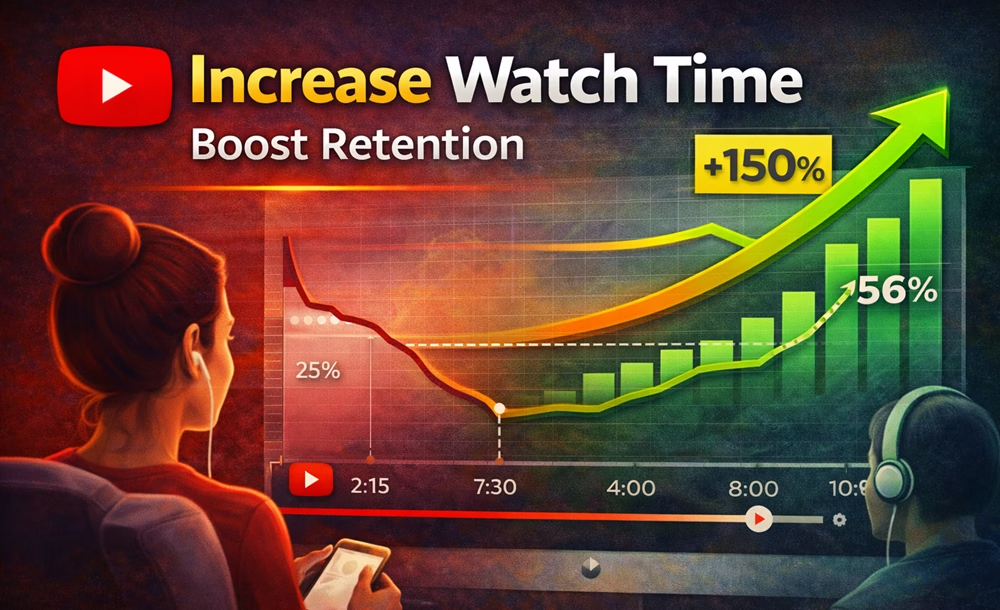
  • Case Study Result: Applying these techniques (pacing, hooks, and interrupts) can realistically boost retention from 21% to 56%.

If CTR gets people to click, watch time and audience retention are what make your videos rank and grow.

On YouTube, retention is one of the strongest ranking signals. If viewers keep watching your content, YouTube pushes it to more people. If they leave early, your reach drops—no matter how good your topic is.

In this guide, you’ll learn exactly how to increase watch time and retention with practical strategies you can apply immediately.

Table of Contents

What is Watch Time & Audience Retention?

  • Watch Time: Total minutes people spend watching your video
  • Audience Retention: Percentage of your video that people watch

You’ll be clear about it from this example:

  • 10-minute video
  • Average watch time: 5 minutes
  • Retention = 50%

Higher retention = higher ranking potential.

Why Retention Matters More Than Views

A video with 1,000 views + high retention can outperform 10,000 views + low retention.

Because YouTube prioritizes:

  • viewer satisfaction
  • session time
  • engagement

So, retention is the real growth engine.

Watch time is a key ranking factor. Learn the full strategy in our YouTube SEO guide.

Steps to Increase Watch Time and Audience Retention

Step #1: Hook Viewers in the First 15 Seconds

The biggest drop happens at the beginning. It is where you should put your best effort.

What to do:

  • Skip long intros
  • Start with the result
  • Create curiosity
  • Confirm the value immediately

An example hook:

Most students fail at maths. Here’s how to study smarter and score higher than others.

Choosing the right topic also creates interest and improves retention. Read our guide on low-competition YouTube topics.

Step #2: Use the “Open Loop” Technique

Open loops create curiosity that keeps viewers watching.

Say something like:

  • There’s one mistake most creators make… I’ll show it later.
  • Stay till the end for the best strategy.

This keeps people engaged longer and watching to the end.

Step #3: Structure Your Video Properly

Unplanned videos may stop watching anytime. Add the following elements to your future video structure:

  1. Hook
  2. Problem
  3. Solution (step-by-step)
  4. Example
  5. Summary
  6. Call to action

Avoid random flow. Structure = clarity = retention.

In the beginning, it may be difficult for you. You can develop the skill with consistent effort in every video you produce.

Step 4: Cut Boring Parts (Fast Editing)

Retention drops when:

  • you repeat points
  • you pause too long
  • you add filler content

How to fix it with your video editor:

  • Cut any dead space
  • Keep the boring parts pacing fast
  • Add jump cuts where needed

Every second should add value. If not, the repetitive or boring scenes stop viewers from watching any longer.

Step #5: Use Pattern Interrupts

A “Pattern Interrupt” is any change in the visual or auditory flow that forces the brain to pay attention again. Apply the following techniques with your video editor. You should aim for an interrupt every 5 to 10 seconds.

1. Visual Shifts (The “Camera B” Trick)

You don’t need two cameras to create visual variety. Use these “fake” multi-cam techniques:

  • The Digital Zoom: If you are filming in 4K but exporting in 1080p, you can “zoom in” 150% during editing for key points without losing quality.

  • The Crop-In: Cut to a tighter frame when telling a secret or making a serious point to create an intimate “close-up” feel.

  • Directional Pans: Slowly slide the frame from left to right during long explanations to keep the eyes moving.

2. Strategic B-Roll & Overlays

Never let a “talking head” shot run for more than 20 seconds.

  • Stock Footage: Use sites like Pexels or Storyblocks to show what you are talking about. If you mention “growth,” show a plant sprouting or a graph climbing.

  • Text Pop-ups: Don’t just say a keyword—animate it onto the screen. Use bold, high-contrast fonts that match your brand.

  • The “Paper Texture” Overlay: Add a subtle grain or “film burn” effect during transitions to give your video a premium, cinematic texture.

3. Auditory Resets

The ears get bored just as fast as the eyes.

  • Sound Effects (SFX): Use a subtle “whoosh” for transitions or a “ding” when text appears. This creates a sensory “anchor” for the viewer.

  • Music Shifts: Change the background track when moving from the “Problem” section to the “Solution” section. A shift in tempo signals a mental shift for the audience.

  • The “Silent Treatment”: Occasionally, cut all music and sound for 1–2 seconds before a major revelation. The sudden silence is one of the most powerful pattern interrupts available.

4. Use AI-Powered Tools

In 2026, you don’t have to do this manually. Tools like CapCut or Adobe Premiere’s AI can now:

  • Auto-Reframe: Automatically keep you centered while adding movement.

  • Auto-Captions: Generate dynamic, “MrBeast-style” captions that change color and bounce, acting as a constant pattern interrupt.

Pro Tip: Watch your video on mute. If you can still understand the “energy” and flow of the video just by looking at the visual changes, your pattern interrupts are working.

Step #6: Talk Like a Human (Not a Script)

Over-scripted videos feel robotic.

Instead:

  • Use a conversational tone
  • Keep sentences simple
  • Add natural pauses
  • Speak clearly

👉 People stay longer when content feels real.

Step #7: Deliver Value Early

Viewers don’t waste their time on uninteresting videos. So, do not “delay the value.”

Don’t do:

  • Long intro → explanation → value

Do:

  • Value → explanation → deeper value

Because it gives viewers a reason to stay immediately.

Step #8: Use Re-engagement Hooks

Every 20–30 seconds, bring viewers back.

Say something like:

“Here’s where it gets interesting…”

“This next tip changed everything…”

“Most people miss this…”

Doing so resets viewer attention and keeps them watching. 

Use the right tools to improve your content quality with our best free YouTube tools guide.

Step #9: Analyze Retention Graph

YouTube Studio is a useful tool. Use it to find:

  • Where viewers drop
  • Where they rewatch
  • Which parts perform best

What to do:

  • Fix drop points
  • repeat successful patterns
  • improve weak sections

The Studio data helps in your channel growth.

Step #10: Match Content with Title & Thumbnail

If your thumbnail promises one thing and the video delivers another, viewers leave.

This kills retention. So, always:

  • match expectation
  • deliver what you promise
  • avoid clickbait

Step #11: Increase Session Watch Time

YouTube rewards videos that lead to more watching. Increase watch time within your channel.

Do this:

  • link to next video
  • use playlists
  • add end screens
  • suggest related content

This keeps viewers on your channel longer.

Step #12: Optimize for Mobile Viewing

Most viewers watch on mobile. Video optimization for mobile devices is necessary.

Useful Tips:

  • use large text
  • avoid small details
  • keep visuals clear
  • zoom important elements

👉 Better visibility = better retention.

Combine retention with growth strategies in our complete YouTube growth guide.

Watch this video from TubeSpanner for extra tips:

⚠️ Common Retention Mistakes

Now, remember these mistakes and avoid them:

  • long boring intro
  • no structure
  • slow pacing
  • too much talking, no visuals
  • misleading thumbnails
  • no engagement hooks

Simple Retention Formula

Use this technique:

Hook + Value + Curiosity + Pacing + Structure = High Retention

Retention Optimization Checklist

Before publishing any video on YouTube, ask yourself these questions:

  • Strong hook in first 15 seconds?
  • Value delivered early?
  • Clear structure?
  • Fast pacing?
  • Pattern interrupts used?
  • Re-engagement hooks added?
  • Matches thumbnail/title?

If yes, your video has high retention potential.

The 2026 Strategies

To stay ahead of your YouTube competitors, you must account for the two biggest shifts: Artificial Intelligence and Vertical Video.

1. Leverage AI to Automate Retention

In 2026, you don’t have to spend 20 hours editing to get high retention. Use AI tools to do the heavy lifting:

  • AI Script Analyzers: Use tools like ChatGPT or Claude to scan your script for “fluff.” Ask: “Where am I being repetitive?” and cut those sections before you even hit record.

  • B-Roll Generators: If you lack footage, use AI video generators (like Sora or Runway) to create custom visuals that illustrate complex points and keep the viewer engaged.

  • Dynamic Captions: AI-powered captions aren’t just for accessibility anymore; they are a visual “pattern interrupt.” Use them to highlight key terms as they are spoken.

2. The “Shorts” Retention Rule (Vertical Video)

Retention for YouTube Shorts is a different game. While 50% is great for long-form, Shorts require 90%–100%+ retention to go viral.

  • The Infinite Loop: Design your Short so the end flows perfectly back into the beginning. This often results in viewers watching the video 1.5 times, sending a massive “satisfaction” signal to the algorithm.

  • Micro-Hooks: In a 60-second video, you need a new hook every 3 seconds, not every 15.

3. Community Engagement as a Retention Tool

Retention isn’t just about the video file; it’s about the Comment Section.

  • The Pinned Comment: Pin a question related to a point made halfway through the video.

  • The “Easter Egg”: Mention a small detail or hidden visual and ask viewers to find it. This encourages “rewatching,” which spikes your retention graph in YouTube Studio.

4. Accessibility & Global Retention

Don’t ignore the “Silent Viewer.” A significant portion of your audience watches in public places without sound.

  • Visual-Only Context: Ensure your “Pattern Interrupts” (text and graphics) tell the story on their own.

  • Multi-Language Audio: Use YouTube’s multi-language audio tracks to reach global audiences. A viewer is far more likely to stay if the content is in their native tongue.

Case Study: Improving Watch Time & Retention

🔴 Before Optimization

One of my YouTube videos (@99learners) is found as shown below on Audience Analytics:

  • CTR: 4.2%
  • Average View Duration: 2:10 (on a 10-minute video)
  • Audience Retention: ~21%
  • Views (7 days): 1,200

Problems:

After examining closely, I found these problems:

  • Weak intro (long and slow)
  • No clear hook in the first 15 seconds
  • Too much talking, no visual changes
  • No re-engagement points

🟢 After Optimization

After improving the video using retention strategies, I could improve:

  • CTR: 6.8%
  • Average View Duration: 5:40
  • Audience Retention: ~56%
  • Views (7 days): 6,500+

Changes Made:

  • Added a strong hook in the first 10 seconds
  • Cut unnecessary intro
  • Inserted pattern interrupts every 5–8 seconds
  • Added on-screen text and examples
  • Used re-engagement phrases throughout

Result

My video started ranking higher on **YouTube search and was pushed into suggested videos, leading to a 5× increase in views within one week.
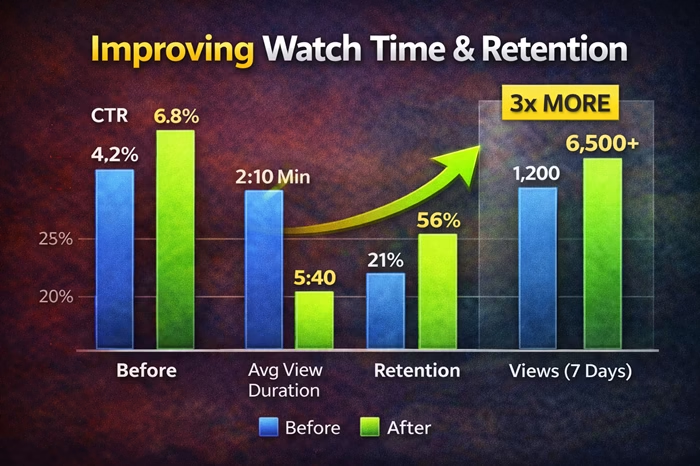
Image showing Improvements of Watch Time & Retention

Key Takeaway

Those small improvements in hook, pacing, and structure can dramatically increase watch time and retention, which directly boosts rankings.

Final Thoughts

YouTube growth is not just about getting views—it’s about holding attention.

Creators who:

  • hold attention
  • deliver value
  • keep viewers watching

…win on YouTube.

Focus on retention, and everything else—views, subscribers, and rankings—will follow.

FAQ

What is a good audience retention rate?

It depends on the video length, but higher retention compared to your previous videos is the key goal.


How can I increase watch time fast?

Improve your hook, remove boring parts, and keep viewers engaged with better pacing and structure.


Why do viewers leave my videos early?

Usually due to weak hooks, slow pacing, or a mismatch between the title and the content.


Does watch time affect YouTube ranking?

Yes. Watch time and retention are among the most important ranking factors.

Disclosure: We are partners or associates of Amazon and other top brands. We may earn a small amount from qualifying purchases without increasing the price. Please read our full affiliate disclosure here.

Leave a Comment

Your email address will not be published. Required fields are marked *

CommentLuv badge

This site uses Akismet to reduce spam. Learn how your comment data is processed.

Scroll to Top